Every time I finish a GG Poker tournament, I feel a mix of satisfaction and curiosity. Whether the tournament ended with a big win or yet another near miss, I know there’s something deeper to find in the hands I played. Over the years, I’ve learned that reviewing your tournament history is the best way to see where your game shines and where small changes could make a huge difference. In this article, I’ll share how I break down my own GG Poker tournaments using clear, actionable steps, and how a tool like Check Replay makes a true difference when it comes to tracking, sharing, and understanding those key hands.
Why should you review your tournaments?
After each tournament, emotion can cloud our memory. I used to rely on my feelings about a session—thinking about that one bad beat or lucky river. But with time, I noticed that how I felt was not always in line with the reality of my play.
Memory lies. Hand histories do not.
Reviewing helps me recognize patterns, reveal leaks, and build up my strengths. In fact, consistent hand review has been the backbone of every noticeable improvement in my own results.
Step one: Gathering your GG Poker hand histories
First, you need to collect the raw material: your tournament hand histories. GG Poker makes this possible in a few simple steps.
Here’s how I do it:
- After finishing a tournament, I open the GG Poker desktop or mobile app.
- go to PokerCraft inside GG Poker, then ‘My tournaments’
- I select the tournament I just played.
- Download the hand history you want to review.
You can see the step by step in this video as well: https://www.youtube.com/shorts/fEb1Aihk90k
Keeping these files organized is the next step. I save each one with the tournament name, date, and my finish position. It turns future searches into a breeze.
Step two: Choosing the right review tool
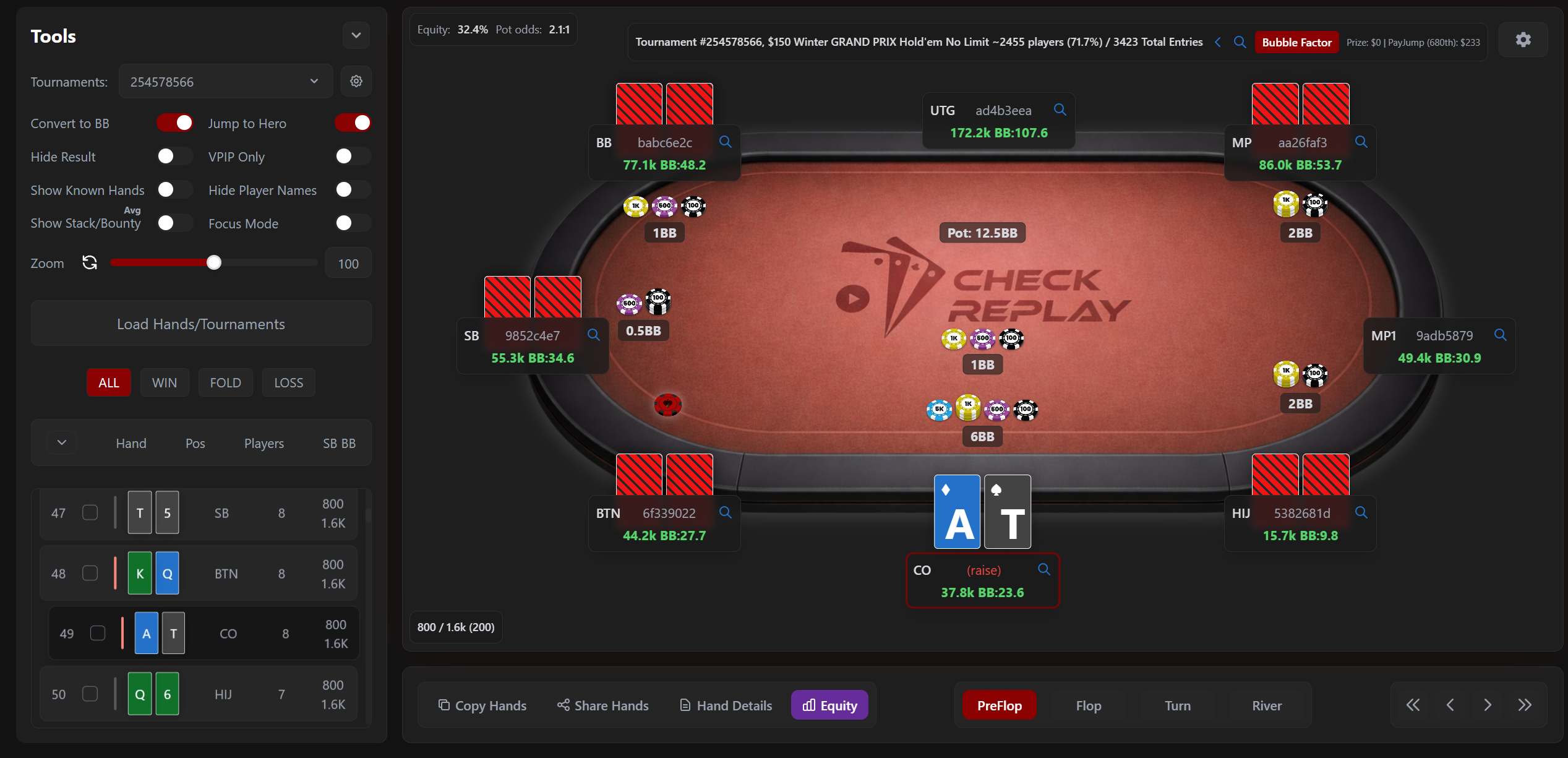
For a long time, I struggled with clunky solutions and endless spreadsheets before getting to know Check Replay. A good review platform lets you replay every hand, share hands easily, and add custom notes—all without downloading heavy software. Check Replay, in particular, helps by providing:
- Instant upload and replay of your hand history files
- Shareable links so coaches or friends can see exactly what you’re talking about
- Customization of how hands are displayed, making the review experience both simple and flexible
- Visual and statistical analysis, including built-in odds and showdown equity calculators
I noticed that with these features, reviewing hands became not just easier, but actually enjoyable. I now spend less time struggling with formats and more time thinking about strategy.
If you want to go further and get a full process, the complete poker tournament review process I wrote earlier provides extra tips.
Step three: Structuring your review process
I’ve learned that chaos makes for poor reviews. So, I like to break my review down into focused steps, giving structure to what could otherwise feel overwhelming.
- Start with big turning points.These are hands where your stack changed dramatically, or you faced key shove/fold or call/fold decisions. By prioritizing these hands, I can focus first on pots that impacted my tournament’s outcome the most.
- Go through each phase of the tournament.I look separately at early, middle, and late stage hands. Sometimes I spot very different patterns—playing too tight early, maybe too loose late.
- Tag interesting or confusing hands.With Check Replay, I can set these hands aside to show a coach or run more detailed calculations later.
- Re-watch hands from the villain’s point of view.I love tools that let me see what my opponents might have been thinking. This helps me build better reads for next time.
- Write notes for future reference.One short note—like “folded too soon on river?”—can save me hours of frustration if the situation comes up again next week.
Step four: Analyzing mistakes and patterns
If there’s one thing I try to always remember: focus on why each decision was made, not just what happened. Here’s how I look for improvement:
- Review your range: Would your hand be a raise, call, or fold based on your position and stack? Did you follow your pre-tournament plan?
- Spot bet sizing errors: Was your open too big? Did you miss a value bet or try to bluff too far?
- Pay attention to recurring leaks: Maybe you always call with marginal hands or misunderstand pot odds in big spots.
- Use the visualizations: I use odds calculators and showdown charts in Check Replay to double-check my reads.
The goal is not to torture myself over every small slip, but to notice where similar mistakes keep popping up—even when I win the hand. Sometimes I find that my biggest leaks are in hands I “lucked” into winning.
Step five: Sharing and discussing with others
When I feel stuck or unsure about a hand, nothing beats a fresh pair of eyes. Check Replay’s share feature lets me send hands directly to friends or coaches for second opinions. The instant link sharing is a big plus for group study sessions or coaching calls.
Often, just explaining my thought process to someone else points out gaps in my logic. The feedback I’ve received this way has been worth every minute.
Step six: Setting up action points for the next session
Every review should create clear goals for your next tournament.
- If I notice I’m getting out of line with certain hands, I set a reminder to play tighter there.
- If late-stage aggression cost me chips, I try specific adjustments next time.
- If I spot a persistent misunderstanding of odds, I commit to reading or practicing calculations before my next game.
Instead of just “learning,” this makes the review process something real and practical—one that actually drives results at the tables.
Bonus: Making review a regular habit
I admit, years ago I only reviewed after a bad streak or a big loss. It was a mistake. Now, I recommend regular, scheduled reviews—regardless of result. Not every tournament needs a full deep-dive, but even 10 minutes after each session can add up fast.
It’s the little improvements that separate lucky runs from real progress.
I always remind my coaching students of that: improvement is a series of small steps, not one big leap.
Extra resources I find helpful
For readers who want more, I recently posted an in-depth GG Poker tournament review guide with advanced strategies and common pitfalls. It might help you push your reviews further.
Conclusion
Reviewing your GG Poker tournaments is the fastest, surest way I know to improve your game, spot your strengths, and fix your leaks.
With a tool like Check Replay, this entire process is quick, user-friendly, and completely shareable. Every player, from the weekend enthusiast to the serious grinder, can benefit from smarter hand reviews. If you want to see these improvements first-hand, I encourage you to try Check Replay for your next session. There’s even a free plan to get you started—your future self at the tables will thank you for every insight.
Frequently asked questions
How to review GG Poker tournament hands?
First, save your hand histories from GG Poker using the app’s built-in export feature. Then upload those files to a hand review tool like Check Replay, where you can replay, tag, and break down each hand. Focus on turning points, edge spots, and hands that puzzled you during the game.
What tools can I use for review?
I suggest using platforms designed for poker reviews, like Check Replay. It stands out for its instant upload, customizable hand replayer, and share features. These functions let you study, annotate, and share hands with friends or coaches without downloading heavy software.
Is it helpful to review my tournaments?
Yes, regular review of your tournaments is one of the fastest ways to find leaks in your strategy and turn knowledge into action at the tables. Every top player I know invests time in reviewing hands, even after a win.
Where can I find hand histories?
You can find your hand histories in GG Poker’s app under the “PokerCraft” section. From there, select your completed tournament and save or email the text file with your hand data. Keeping a dedicated folder for your histories helps keep things organized over time.
How often should I review my plays?
Ideally, make reviews a weekly or after-each-session habit. Short, regular reviews help you catch patterns, avoid repeating mistakes, and keep your skills sharp over time. Even 10–15 minutes after a session can bring value.