Studying difficult tournament spots often involves more than replaying a single hand.
You may want to review several decisions from the same tournament, send them to a coach or study group, run some of those spots in HoldemResources Calculator (HRC), compare strategies, save notes, and come back to the analysis later.
With HRC Storage in Check Replay, that entire process can now stay connected.
Get 10% OFF HoldemResources Calculator
You can select multiple hands, share them through a single Check Replay link, and allow people with access to the shared hands to attach HRC analyses directly to them.
The HRC results can then be viewed inside Check Replay, alongside the original hand, notes and other study material.
Your Replayer subscription includes 10 GB of HRC storage.
Here is how the workflow works.
1. Select the Hands You Want to Study and Share Them
Start by loading your hand history or tournament into Check Replay.
Instead of sharing hands individually, you can select multiple hands directly from the hand list.
This is particularly useful after a tournament when you have several spots you want to review with a coach, poker team or study group.
Select the relevant hands and click Share Hands.
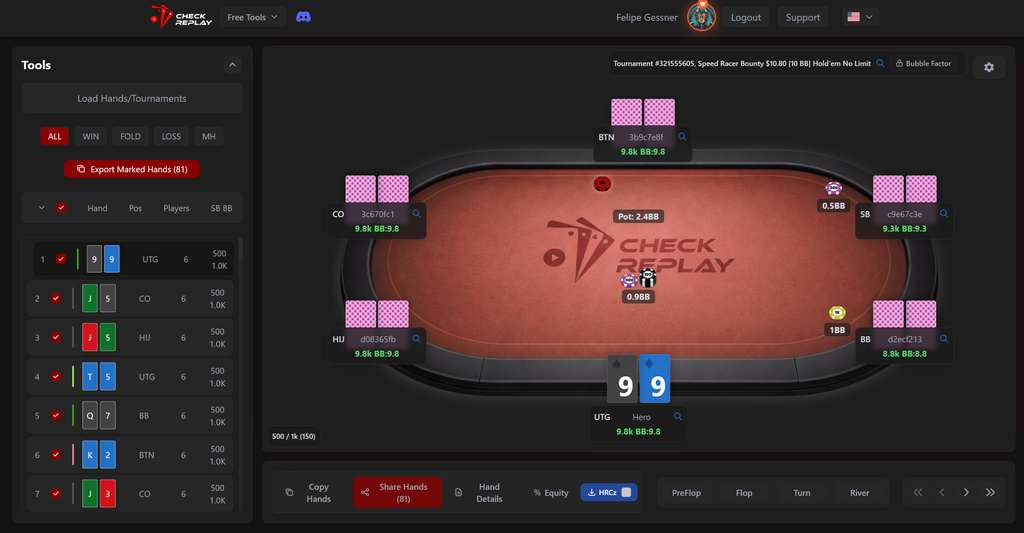
Check Replay generates a single cloud link containing all of the selected hands.
Instead of sending several hand histories, screenshots or separate replayer links, everyone can access the same collection of hands from one place.
The workflow becomes:
Select hands → Share Hands → Generate one link → Study together
And now there is another important part of that workflow:
people with access to those shared hands can attach HRC files to the analysis.
This means one player can upload the hands, another can run the HRC calculation, and the entire group can access the result from the same shared study environment.
2. Attach an HRCz File to a Hand
Once a spot has been analyzed in HoldemResources Calculator, save the result as an HRCz file.
Inside Check Replay, navigate to the corresponding hand and use the HRCz option to attach the calculation.
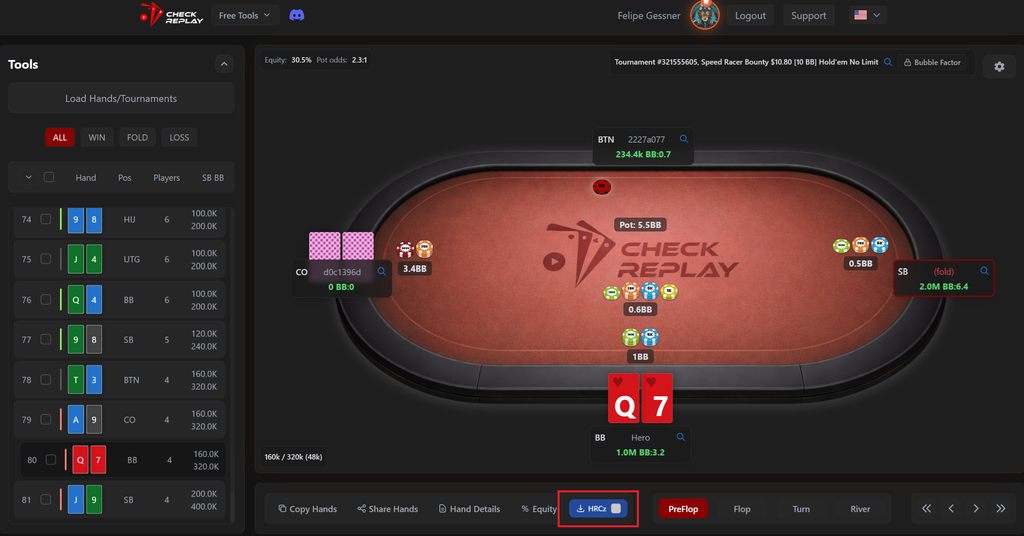
The HRC calculation now stays connected to the exact hand that generated it.
This becomes especially useful when studying multiple spots from the same tournament.
Instead of having files such as:
9left-Q7s.hrcz
FT-BTNvsBB.hrcz
12left-reshove.hrcz
scattered across folders on different computers, each analysis can remain attached to its original hand.
You can also attach multiple HRC analyses to the same hand.
This is useful when you want to compare:
- different opponent ranges;
- different stack assumptions;
- different ICM configurations;
- different bounty assumptions;
- alternative preflop actions;
- or different versions of the same calculation.
3. Study HRC Spots Together
This is where HRC Storage becomes particularly useful for group study.
Imagine a poker team reviewing a tournament.
One player selects 15 difficult hands and shares them through a single Check Replay link.
Different members of the group can then open those hands and work on different spots.
One player might analyze an early final-table shove.
Another might study a reshove situation.
A coach might run a different configuration to test whether changing one assumption affects the strategy.
The resulting HRC files can all remain connected to the relevant hands.
Instead of having the discussion spread across:
- Discord messages;
- screenshots;
- hand-history files;
- HRCz files;
- solver folders;
- and separate replayer links;
the study material stays organized around the hands themselves.
That makes the shared link more than a collection of replays.
It becomes a shared study workspace for the tournament.
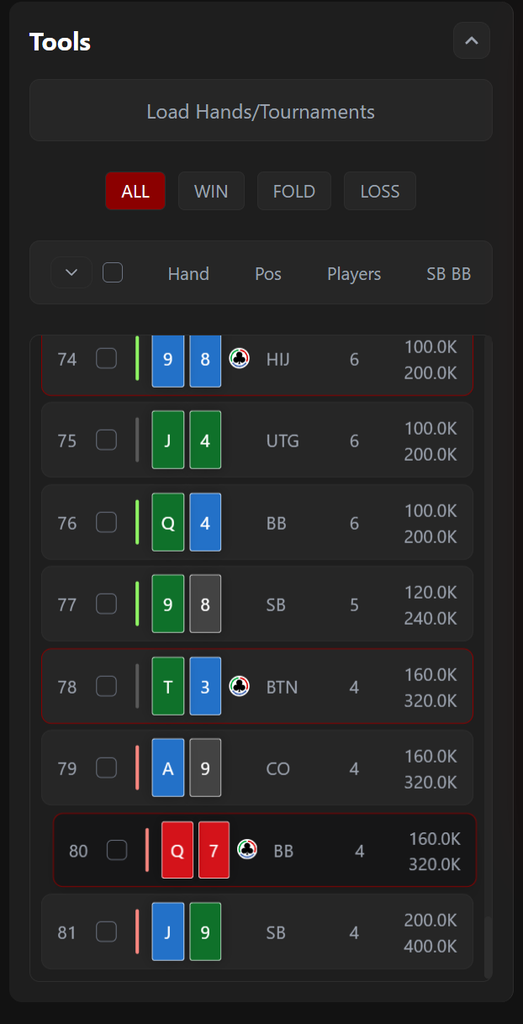
You can easily find the solved spots scrolling Check Replay hand lists:
4. View HRC Results Directly Inside Check Replay
Uploading an HRCz file is not only about storing the original file.
Check Replay can read the HRC tree and display the results directly inside the platform.
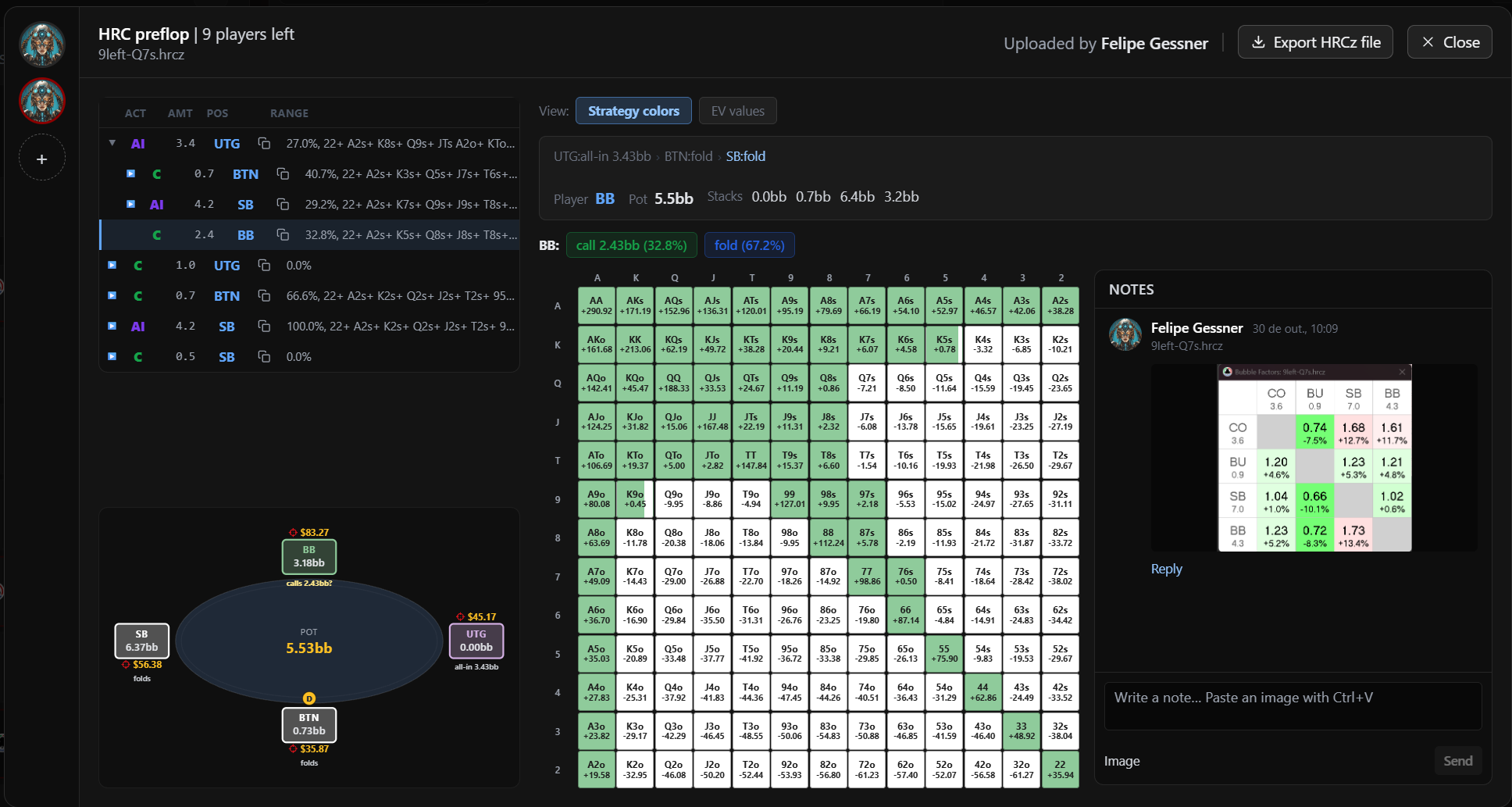
From the HRC viewer, you can navigate through the actions in the tree and inspect the strategy at each node.
Depending on the spot, you can see information such as:
- player positions;
- stack sizes;
- pot size;
- available actions;
- action frequencies;
- ranges;
- and individual hand results.
This means you can move from:
the actual hand
to:
the solver analysis
without having to recreate the situation or constantly switch between programs.
5. View Strategy Frequencies and EV Values
Inside the HRC viewer, you can inspect the solution in different ways.
With Strategy Colors, the matrix makes it easy to see how different parts of the range behave.
You can quickly identify:
- folds;
- calls;
- raises;
- all-ins;
- pure strategies;
- and mixed strategies.
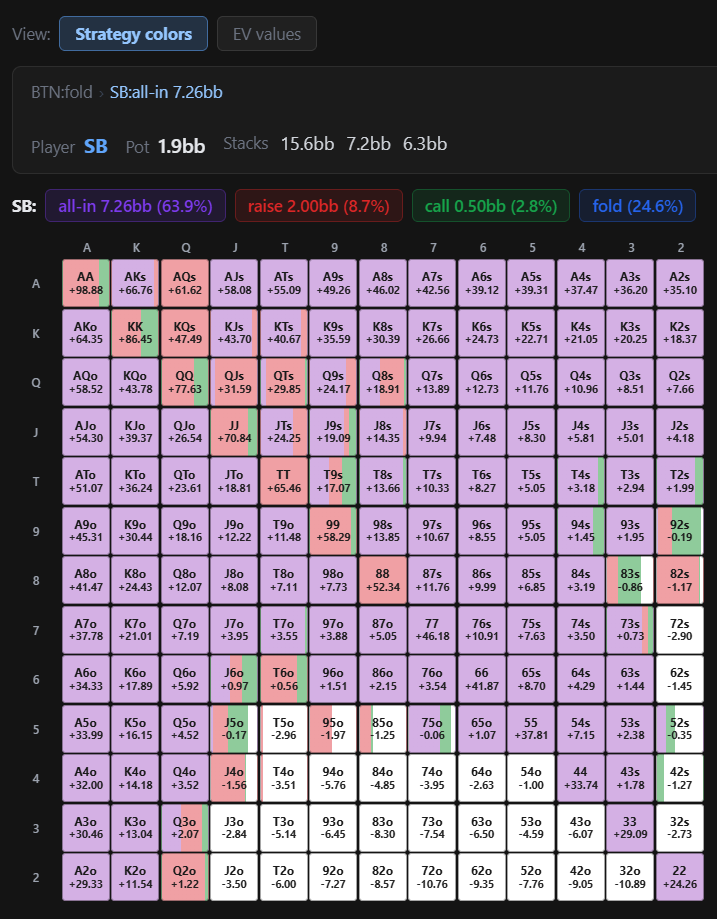
You can also switch to EV Values when you want to examine the expected value of individual hands.
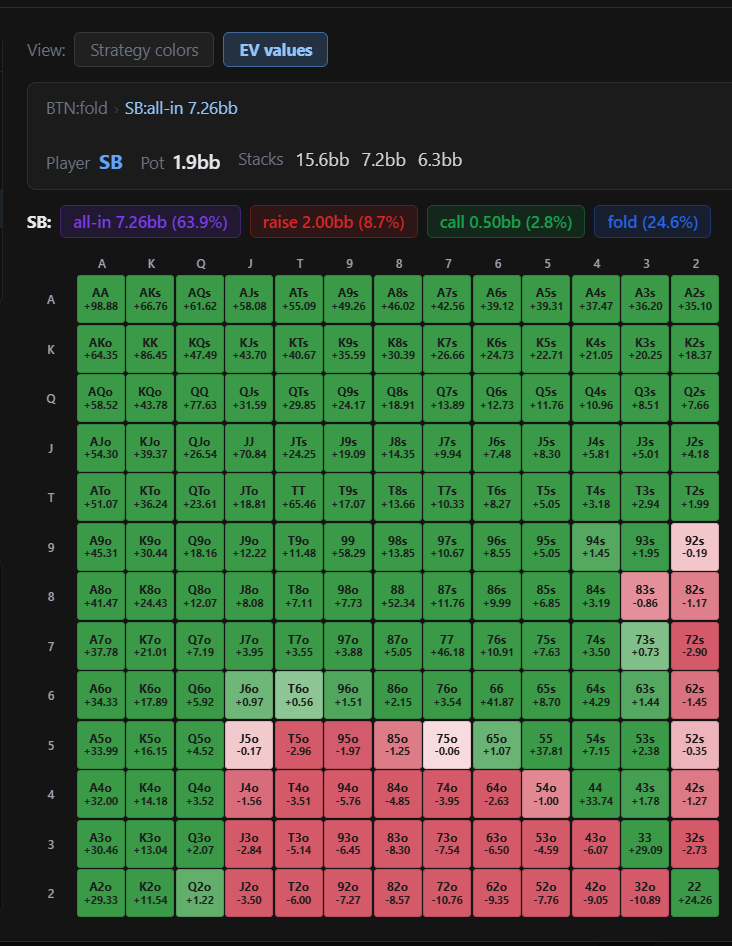
This is useful when two actions are strategically close.
Instead of only asking:
“What action does HRC prefer?”
you can also investigate:
“How much EV do I actually lose by choosing the alternative?”
That distinction can be very important when turning solver output into practical poker strategy.
6. Navigate Through the HRC Decision Tree
The HRC viewer also allows you to navigate through the different actions in the calculation.
The action tree shows how the strategy develops after each decision.
For example:
UTG shoves → BTN responds → SB responds → BB responds
Selecting another node updates the strategy being displayed.
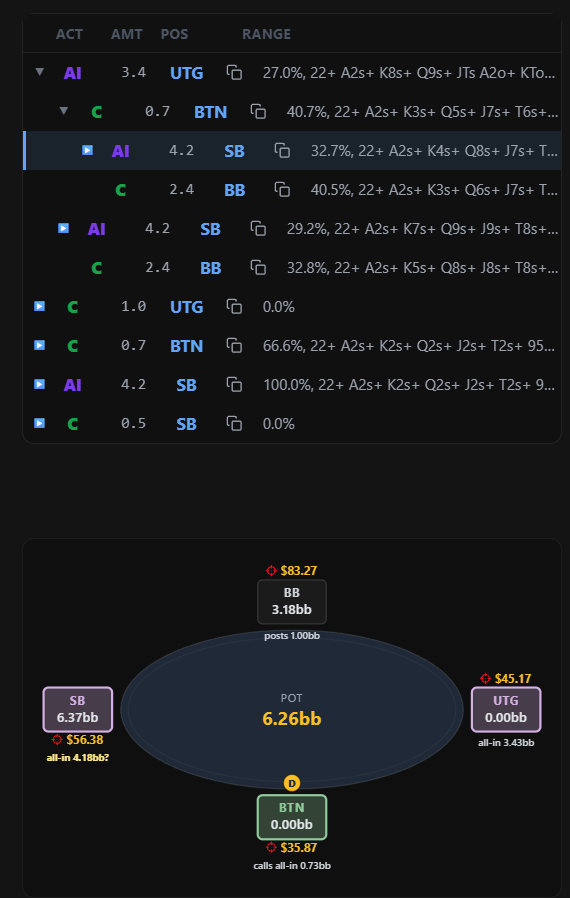
This makes it possible to investigate more than the exact action that occurred in the original hand.
You can explore alternative branches and understand how the ranges change when the previous action changes.
This is particularly useful in:
- push/fold situations;
- reshove spots;
- final-table decisions;
- ICM-sensitive situations;
- and other preflop tournament scenarios.
7. Add Notes and Images to the Analysis
Looking at a solver output is only part of studying a hand.
You may also want to record:
- why the result surprised you;
- what assumptions were used;
- what you discussed with your coach;
- what you want to remember;
- or what additional information influenced the decision.
For that reason, HRC Storage includes a Notes section alongside the calculation.
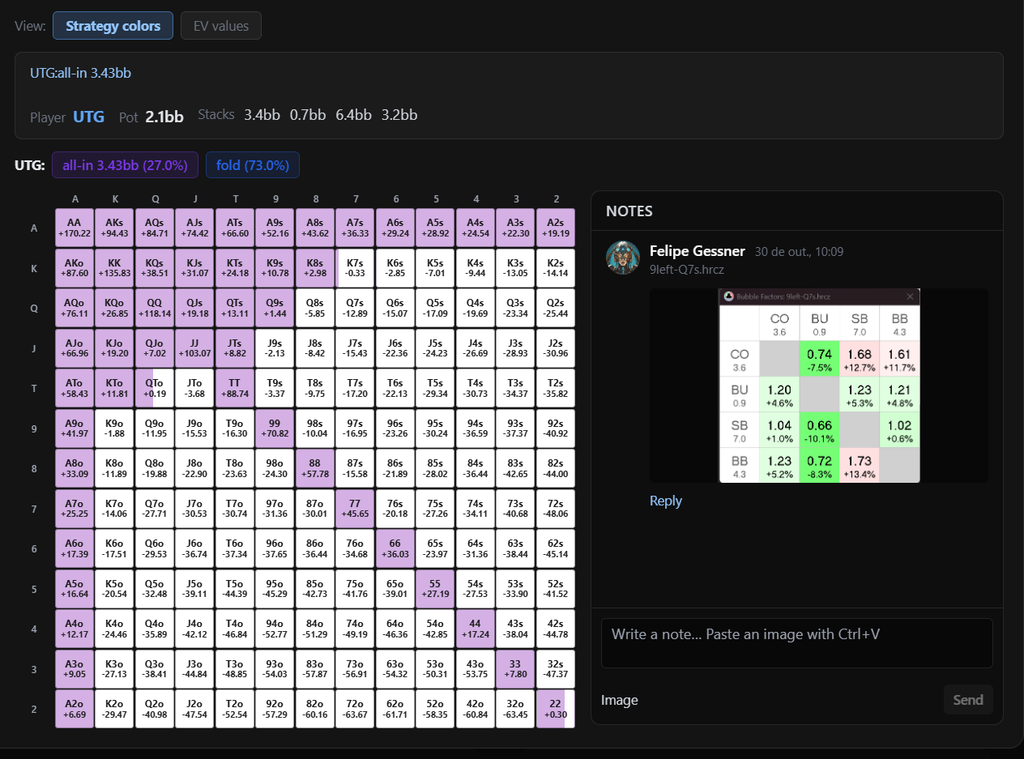
You can write notes directly next to the analysis and paste images into the discussion.
For example, you could add:
- a Bubble Factor calculation;
- payout information;
- another solver screenshot;
- a range comparison;
- a coach’s explanation;
- or your final conclusion from the spot.
This helps preserve something that is often lost when solver files are stored alone:
the reasoning behind the analysis.
Months later, you do not only see what HRC calculated.
You can also see why you ran the calculation and what you learned from it.
8. Export the Original HRCz File Anytime
Uploading an HRC file to Check Replay does not lock it inside the platform.
You can use Export HRCz file whenever you want the original file again.
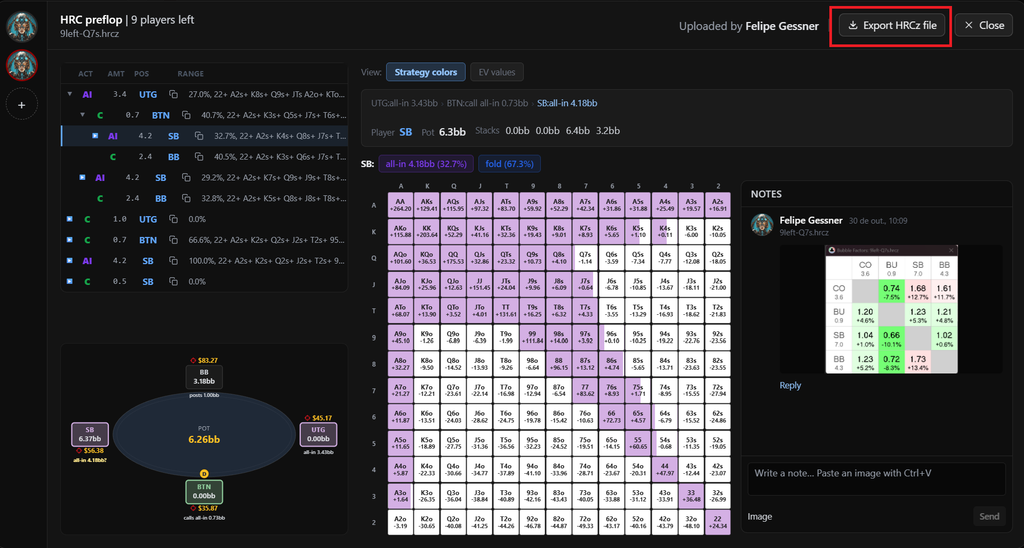
You can then open it normally in HRC and continue studying or modifying the calculation.
Check Replay compresses stored files to optimize the available storage.
When you export the file, Check Replay automatically restores it so that you receive the original HRCz file again.
This allows Check Replay to function as both:
a way to view the HRC analysis inside your hand review
and
a storage location for the original HRCz file.
9. Manage Your HRC Storage
The standard Check Replay Replayer subscription includes 10 GB of HRC storage.
Stored files can be managed from your profile.
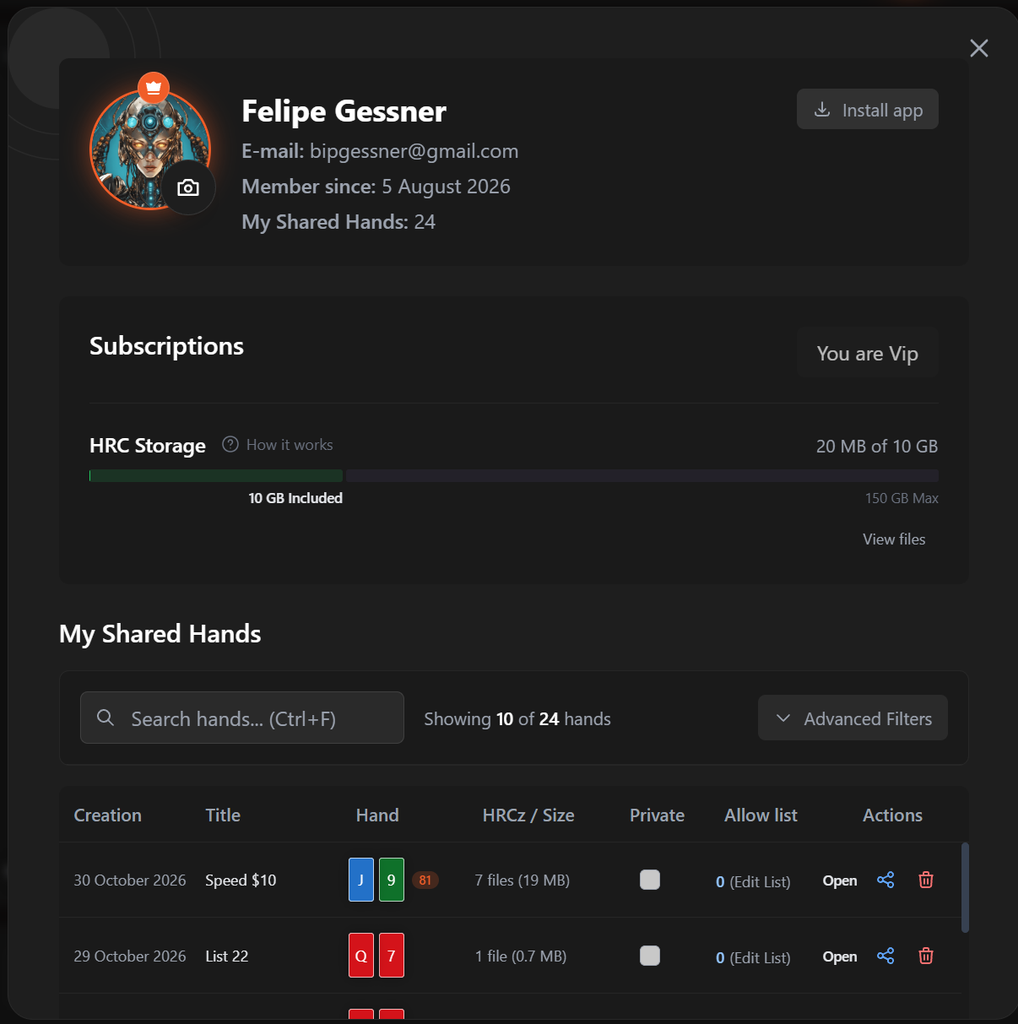
If you no longer need to keep a particular original HRCz file in storage, you can delete it to free space.
Deleting the stored HRCz file does not delete the HRC tree already saved inside Check Replay.
This means you can manage your storage while keeping important analyses available for future study.
Don’t Have HRC Yet?
HRC Storage is designed to work alongside HoldemResources Calculator, not replace it.
HRC is where you create the calculation. Check Replay gives you a place to connect that calculation to the hand, view the results, organize your study and share it with other players.
If you do not have HRC yet and plan to subscribe, you can use the Check Replay link below to receive 10% off:
Get 10% OFF HoldemResources Calculator
Once your calculation is complete, export the HRCz file and attach it to the relevant hand in Check Replay.
A Better Workflow for HRC Study
The complete workflow can now look like this:
Play a tournament
↓
Import the tournament into Check Replay
↓
Select the hands you want to study
↓
Share all selected hands through one link
↓
Open the important decisions
↓
Run the spots in HRC
↓
Attach the HRCz files to the corresponding hands
↓
View ranges, strategies and EVs inside Check Replay
↓
Add notes, images and additional context
↓
Study the hands together
↓
Export the original HRCz files whenever you need them again
This is particularly useful for teams and coaching groups.
One person does not need to perform every part of the analysis.
Hands can be shared first and HRC calculations added progressively as different players work through the session or tournament.
Why Store HRC Files With Your Poker Hands?
Solver files accumulate quickly.
A filename such as:
9left-Q7s.hrcz
may be perfectly clear today.
Six months later, you may no longer remember:
- which tournament it came from;
- what happened in the original hand;
- what the payout structure was;
- why you ran the calculation;
- which assumptions you changed;
- what your coach said about it;
- or what conclusion you reached.
Attaching the HRC analysis directly to the poker hand preserves that context.
And when several hands from the same tournament are shared together, the context becomes even stronger.
You are no longer building a folder containing isolated solver files.
You are building a library of:
real hands → real decisions → solver analysis → notes → conclusions.
Final Thoughts
HRC is an extremely powerful tool for tournament analysis, but solver output is only one part of the study process.
The original hand matters.
The tournament context matters.
Your assumptions matter.
The discussion with other players matters.
And the conclusions you take away from the spot matter.
HRC Storage allows these pieces to stay connected.
You can now select and share multiple hands through a single link, attach HRCz calculations to individual hands, collaborate with other players, view HRC strategies and EVs, add notes and images, store the original files and export them whenever you need them again.
Instead of having your hands in one place, solver files somewhere else and your discussion buried in Discord, the entire study process can remain organized around the hands that started it.
Share your next group of hands in Check Replay and build the HRC analysis directly around the decisions you want to understand.