Reviewing a tournament poker hand is rarely just about looking at the cards.
The action, positions, effective stacks, and ranges should always come first. But tournament decisions can also depend heavily on context: Who is the opponent? What stage of the tournament are you playing? How many players remain? What does the payout structure look like?
This is where SharkScope and Check Replay work particularly well together.
The two tools solve different parts of the tournament review process. SharkScope provides useful information about players and tournaments, while Check Replay brings you back to the actual hands, where you can replay the action and analyze the decisions.
Instead of treating them as competing tools, they can be used as part of the same study workflow.
Search a Player on SharkScope Directly From Check Replay
When reviewing a hand in Check Replay, you may want additional information about one of the players at the table.
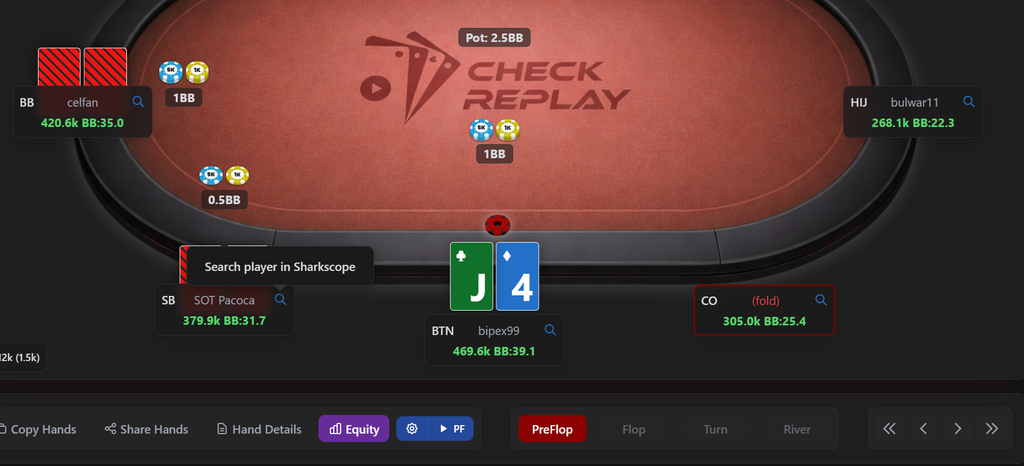
Normally, this means copying the player’s nickname, opening another website, searching for the player, and then returning to the hand.
Check Replay makes this process much faster.
From the replayer, you can search a player on SharkScope with one click, opening their SharkScope profile and graph directly from the hand you are reviewing.
This becomes especially useful when analyzing a difficult decision against an unfamiliar opponent.
You can replay the hand, identify the important decision, and then quickly check the player’s tournament history without interrupting the review process.
The workflow becomes:
Replay the hand → identify the opponent → open SharkScope → check the player’s profile → return to the decision.
It is a small shortcut, but when you are reviewing dozens or hundreds of hands, removing unnecessary steps makes the entire study process much smoother.
Use the Player Graph as Context, Not as the Answer
A player’s SharkScope profile can add useful context, but it should not replace the analysis of the hand itself.
Tournament results cannot tell you exactly what range someone had in one particular spot. A graph also cannot tell you whether a specific river bet was a bluff or whether an opponent will call your shove.
The hand still needs to be analyzed through the information available at the table:
- positions;
- effective stack sizes;
- preflop action;
- postflop action;
- bet sizes;
- tournament stage;
- plausible ranges.
SharkScope simply gives you another piece of information.
For example, when reviewing a close spot against a player you do not recognize, seeing their tournament history can provide additional context about the type of opponent you were facing.
The important distinction is simple:
SharkScope provides context about the player. Check Replay lets you analyze the decision.
That distinction keeps the review focused on poker rather than turning a player’s past results into assumptions about every hand they play.
SharkScope Is Also Useful for Tournament Information
The connection between the two tools becomes even more useful when reviewing tournament-specific decisions.
Player information is only one part of the context.
In tournaments, the payout structure itself can change the value of a decision.
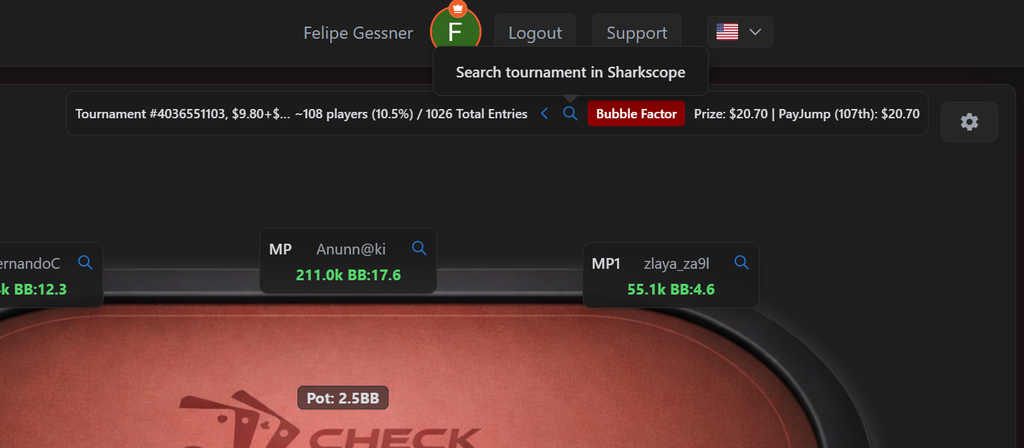
A shove that looks profitable in chip EV can become much less attractive when the risk of elimination carries a significant ICM cost. The same applies to calls, reshoves, and other close decisions near a bubble, pay jump, or final table.
To analyze these situations properly, it helps to know the real tournament structure.
SharkScope allows you to search for the tournament you played and access information about the event, including its payout structure.
Once you find the tournament, you can download the structure and use that information inside Check Replay.
Import the Tournament Payouts Into Check Replay
Check Replay allows tournament payouts to be imported so the hand can be analyzed using the actual prize distribution from the event.
The workflow is straightforward:
- Find the tournament on SharkScope.
- Download the tournament structure.
- Obtain the payout information.
- Import the payouts into Check Replay.
- Return to the hands from that tournament.
- Analyze the important decisions using the real payout structure.
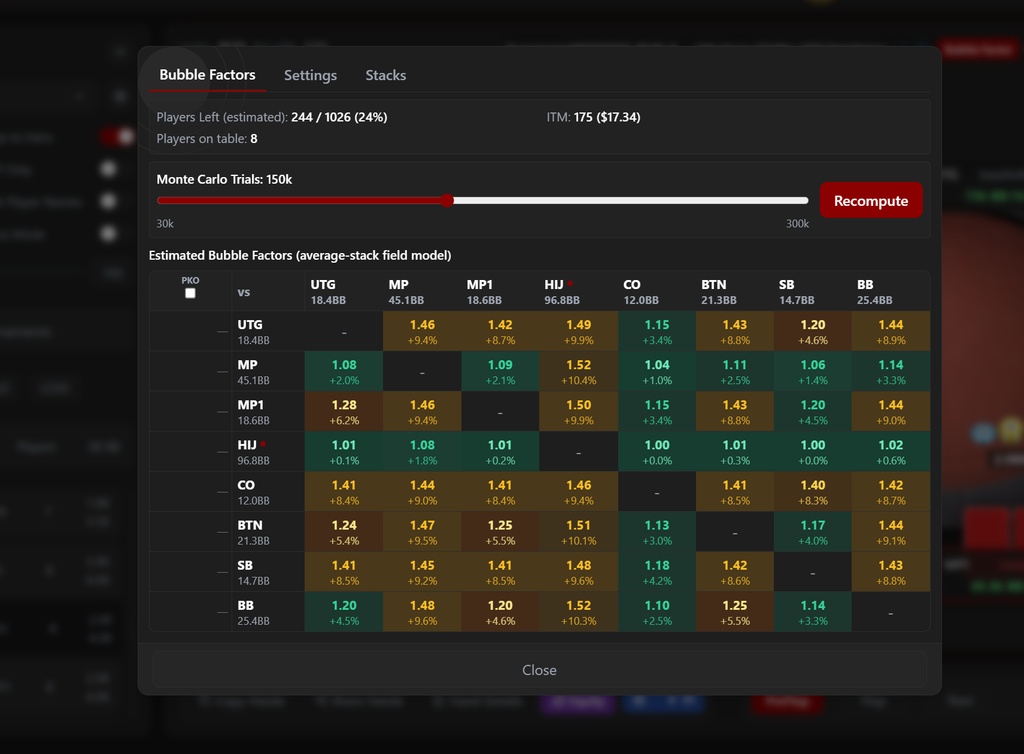
This is particularly valuable when reviewing situations where ICM and Bubble Factor play an important role.
Check Replay can generate a generic payout structure when the exact payouts are unavailable, which makes it possible to analyze tournament situations even when you do not have all the information.
But when the real tournament payouts are available, importing them gives you a more accurate representation of the tournament you actually played.
Why Real Payouts Matter
Tournament chips do not always have a linear relationship with monetary value.
Winning 10 big blinds does not necessarily compensate for the risk of losing 10 big blinds, especially when elimination or a major pay jump is involved.
That difference is one of the reasons Bubble Factor can become so important in tournament analysis.
Imagine reviewing a hand near the final table.
Looking only at the cards and chip stacks may suggest that a call is profitable. But if several shorter stacks remain and the next pay jumps are significant, the cost of losing the hand can be much larger than the benefit of winning the same number of chips.
The payout structure is part of the decision.
By importing the real payouts into Check Replay, you can review the hand using tournament conditions that are closer to the situation you actually faced.
Instead of asking only:
“Was this play profitable in chips?”
you can also ask:
“How much tournament risk was I taking here?”
That is a much more useful question for many bubble and final-table spots.
From Player Research to Hand Analysis
The strength of using SharkScope and Check Replay together is that the workflow moves naturally from broader information back to the actual decision.
A typical review might look like this:
Play the tournament
↓
Import the hand history into Check Replay
↓
Replay an interesting hand
↓
Search an opponent on SharkScope in one click
↓
Use the player’s history as additional context
↓
Find the tournament on SharkScope
↓
Download the real tournament structure and payouts
↓
Import the payouts into Check Replay
↓
Review Bubble Factor, equity, ranges, and the decision itself
The information from SharkScope is not the end of the analysis.
It makes the analysis inside the replayer more complete.
Keep the Hand at the Center of the Review
One of the easiest mistakes when studying poker is collecting information without turning it into a better decision.
Player graphs are interesting. Tournament results are interesting. Payout structures are important.
But the objective is still to understand the hand.
After checking SharkScope, return to the replayer.
Ask whether your original assumptions still make sense. Build the relevant ranges. Compare equities. Look at the Bubble Factor when tournament pressure matters. Test how the decision changes when your assumptions change.
This keeps the study process connected to situations you actually experienced at the table.
And when you want another opinion, the hand can be shared directly from Check Replay with a coach, friend, or study group, allowing everyone to look at the same action and discuss the same decision.
SharkScope and Check Replay Solve Different Parts of the Same Problem
SharkScope is extremely useful for understanding the broader tournament environment.
It can help you research a player, see their tournament history, find a tournament, and recover information about its structure.
Check Replay focuses on what happened inside the hands themselves.
That includes replaying the action, building ranges, comparing equity, analyzing Bubble Factor, reviewing tournament situations, and sharing hands with other players.
Used together, the workflow becomes much more practical:
SharkScope provides the player and tournament context. Check Replay brings that context back to the decisions you actually made.
For tournament players who already use SharkScope, Check Replay can become the next step in that process.
Instead of stopping at the player graph or tournament result, you can return to the hands, reconstruct the situation, and understand what you could do differently the next time the same decision appears.
Try Check Replay for free and use it alongside SharkScope in your next tournament review.